
Everything you need to know about CNNs Part 5: Batch Normalization
You really just need this blog (and the references) to understand batch norm for once and for all!

So far in the series, we’ve covered the Convolution Layer, the Pooling layer, the Dense Layer, and the Activation Function. We’ve discussed how the size of the output and number of parameters is calculated in a separate blog. We’ve also demonstrated the training process of the most basic CNN model from scratch.
Now that we are done with the major components, lets discuss some other aspects which are essential for building a robust and generalized CNN.
Here’s our VGG16 architecture,
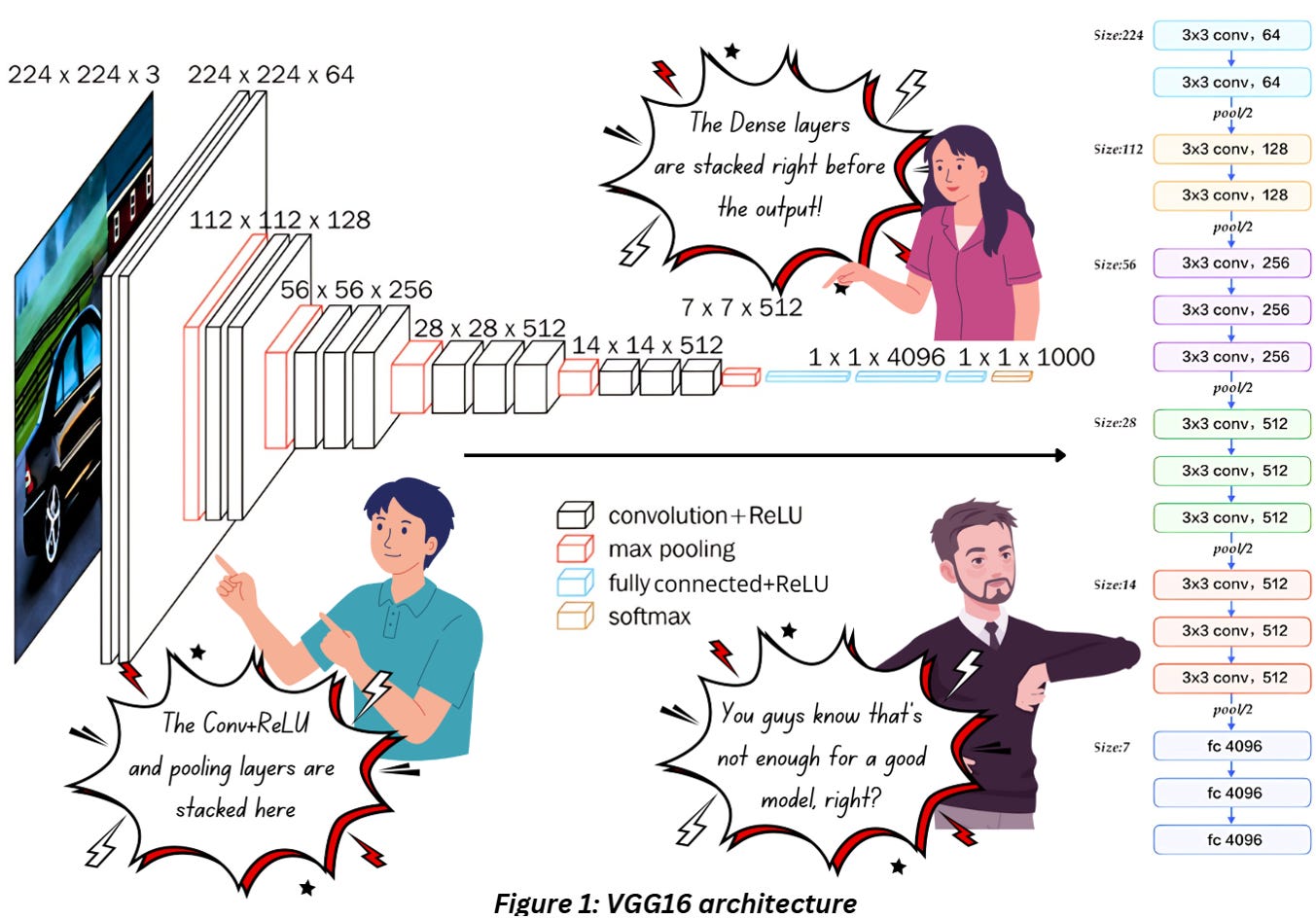
Figure 1 combines everything we discussed till now- we have the convolution layers with ReLU followed by max pooling. We keep stacking these three till we reach the deeper end of the network where we flatten everything and pass it through a few fully connected layers with ReLU. This much is enough for extracting features. If you want to perform classification, then add a softmax activation to the final dense layer and you’re giood to go.
What if I told you that it’s not enough?
Whatever we’ve discussed so far should be okay for basic classification tasks for standard datasets like MNSIT but it’ll flop colossally while training on complex real-world data.
When you work with real-world datasets,
You might have to deal with painfully unbalanced data where some classes have a handful of images and some have thousands
You might have to classify between images where the differences between classes are not that obvious
In such cases, just this basic framework is simply not enough, and you’ll have to use other components/techniques to enhance the performance of your model.
So today we’ll discuss Batch Normalization which is one such important component. It might not be one of the main players, but it definitely plays a big role in improving model performance.
It is also a favorite topic in DL technical interviews!
First, let’s discuss the two terms in the name separately – Batch and Normalization.
SAMPLE VS BATCH VS EPOCH
If we take a single image and pass if through the entire network in the forward direction (direction of the arrow in figure 1), at the end of the network we’ll have a 1D array. This singular input data point (image or the output of the fully connected layers) is known as a sample.
The training dataset will comprise a large number of samples.
Theoretically speaking, the training process would require the entire dataset to be loaded for the loss and gradient computation but if you’re dealing with thousands of images, especially larger ones, you’ll definitely experience a headache dealing with the hardware. That’s where the concept of batch processing comes in handy.
In batch processing, we’ll consider a relatively smaller number of samples (mini batch) for updating the model’s parameters determined by a hyperparameter called batch size. Once we’ve dealt with the entire training data, we’ll call it an epoch.
Remember to set the batch size and number of epochs as hyperparameters before starting the training!
NORMALIZING IMAGES
Check out the code snippet in figure 2 from the blog on training custom CNNs.
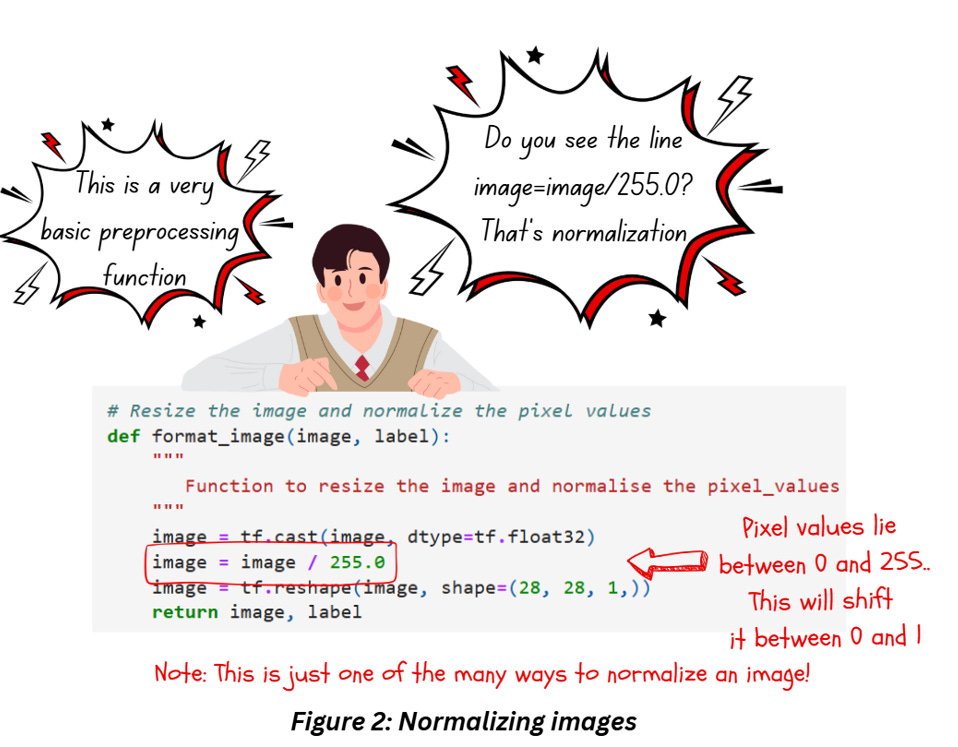
Let’s break it down into stages,
Type casting
The first thing we do is perform type casting – convert the int values to float32 because modern hardware optimizes floating point multiplications more than int (check Reference 5), making the computations a bit easier.
Normalizing images
There are a number of approaches for normalizing images but the one in Figure 1 involves dividing the image pixels by 255 to shift the values between 0 and 1. A better way would be to subtract the mean of the image from each pixel and divide it by the standard deviation of the image, since it centers the image (in the field of ML/DL we do love some symmetry!). For a list of different approaches check out reference 6.
Do we need these additional steps?
Need? Not really…
Prefer? Definitely!
While training our model
we'll be multiplying the weights to the image
which we’ll follow up by adding the biases
What we use as inputs to the model control
the output activations
the loss calculation
and finally, what we finally backpropagate using gradients to train the model
Ensuring that our inputs stay within a certain range ensures our gradients don't go out of control. Our input images already have a range based on our bit-depth but scaling it down to even 0-1 helps in the keeping range of weights small which in turn ensures that we make smaller weight updates during the model training process and helps make a convergence faster.
OVERFITTING, REGULARIZATION AND INTRODUCTION TO BATCH NORMALIZATION
Introducing Regularization
Regularization is a super important concept used across AI/ML and deserves a separate article by itself. Still, we have to talk about it a little bit to understand batch normalization.
The entire process of training a model comes down to one thing – fitting a curve through the data as best as we can while having enough flexibility to work well for new data not available in the original training dataset. The figure below will help sort out any confusion on this,
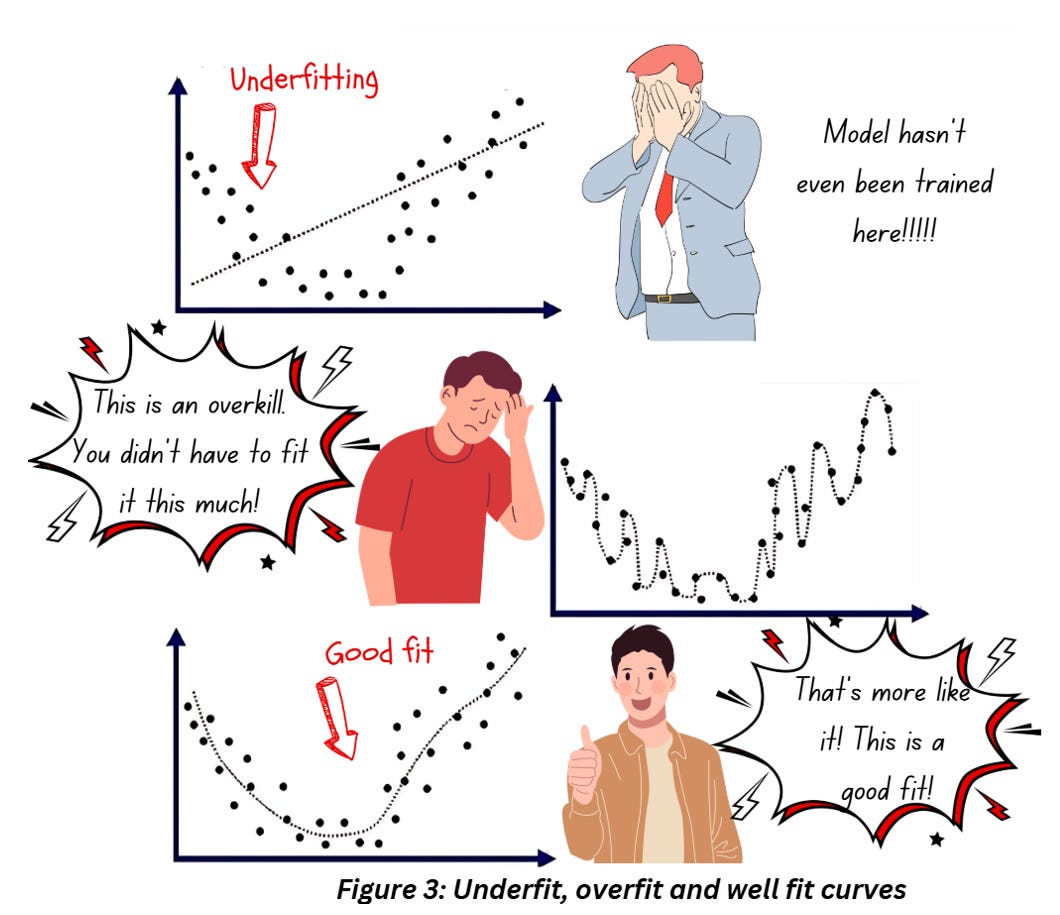
How does regularization prevent overfitting? Regularization approaches normally prevent overfitting by adding a penalty term to the loss function that prevents learning a more complex model, which in turn reduces the chances of overfitting. If you’re new to machine learning, the idea of adding a penalty term to prevent the model from fitting a curve point to point as shown in the central graph in figure 3 might sound counterintuitive, but trust me, you don’t want your model to get so tightly fit else it’ll be useless during the testing (and deployment) phase.
Introducing Batch normalization
So far, we’ve been able to figure out how to squish our inputs into a smaller, centered range. Think about what happens in each of the hidden layers – in general, we’ll be multiplying the inputs to the layer with a bunch of numbers and there’s always a possibility of some part of the output blowing out of proportion!
If you’re thinking “Hey, we already have activation functions to limit the output to a certain range” you’re partially right. Remember, most deep networks use ReLU which don’t do much to keep positive values in check so, if your output is large and positive, the sky is the limit! To prevent something like this happening, we use batch normalization.
Batch normalization is a regularization technique used in the hidden layers of deep networks designed to normalize the feature maps/activations from one layer before being passed to the next layer. As the name suggests, this technique works specifically within a mini batch during the training process.
Where exactly do I insert the batch normalization layer/s?
Batch norm can be inserted
- After convolution or dense layers
- But before the activation layer (including ReLU)
This practise of adding batch normalization before activation is based on the initial paper (reference 9) as an approach to regulate covariance shift. During the training process, the distribution of each layer’s input keeps varying due to the change in the parameters of the previous layers – this is known as covariance shift. Impact? – It slows down the training process and makes it harder to converge.
Note: There is some contradictory observation in recent research that states that models might perform better if batch normalization is added after the activation, but for now we’ll stick to the original paper’s format.
BATCH NORMALIZATION UNRAVELLED
On a high level, batch normalization operates by calculating the mean and variance of the activations for each feature in the mini-batch and then normalizes the activations using these stats. The normalized activations undergo a further round of scaling and shifting using learnable parameters and the result is passed to the next layer.
Did you just say parameters?
You heard it right. Batch normalization does have,
Two trainable parameters called beta(β) and gamma(ϒ)
And two non-trainable parameters called mean moving average(mean) and variance moving average(var)
And all of these parameters are per batch norm so every time you decide to add a batch norm layer in your network, you’ll be adding these four parameters to your network.
Batch norm during training
During training, the network will receive the input data batch wise which will get processed in the batch norm layer during the forward as shown below,
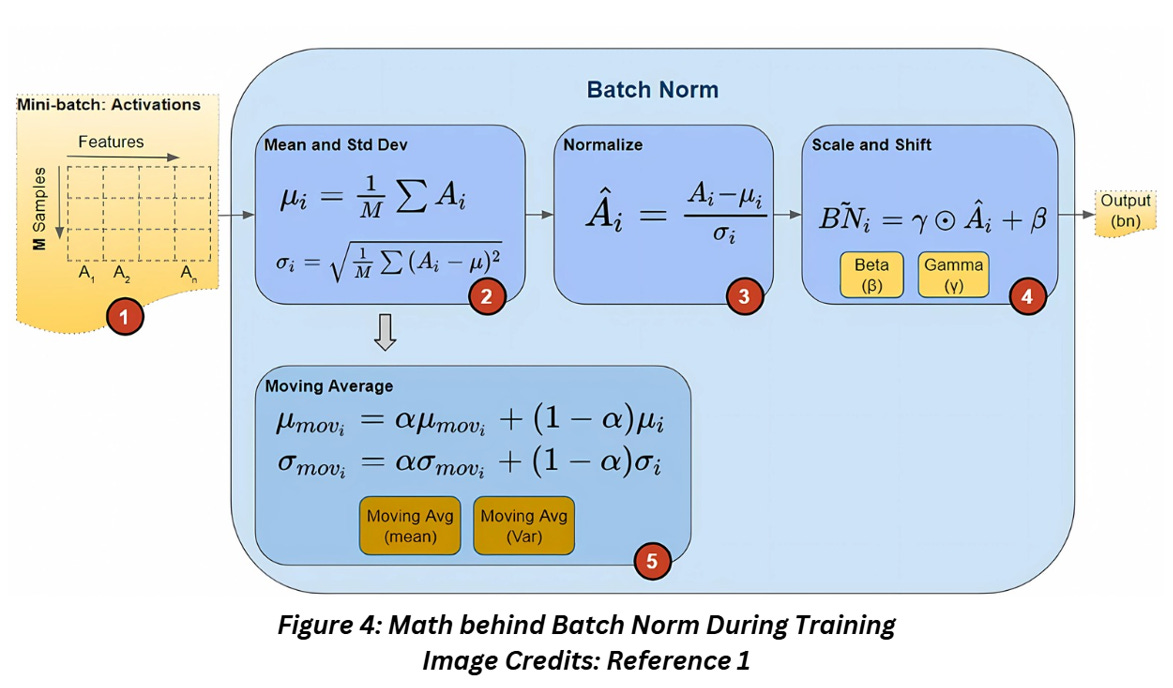
We’ll break down figure 4 step by step:
Batch norm is always inserted between layers so the input to this layer will always be activations from the previous layer. Each feature in the data will generate one activation vector
For each activation vector in the mini batch, the mean and variance for all the values are calculated
Using the mean and variance from the previous step, the normalized values for each activation feature vector is calculated such that the activations are centred at zero and have unit variance (remember how we discussed earlier that this is a good idea for the input data as well?)
Now these normalized values of the activation feature vector can be shifted (to a different mean than zero) and scaled (to have a different variance than 1) by element-wise multiplication to the factor gamma and addition to the factor beta. This step is what makes batch normalization so different from the other approaches I mentioned earlier. Beta and gamma are trainable parameters learned by the network during the training process, which means despite the slight inconvenience of having a few additional parameters, we might just be able to use much better parameters than just by trial and error!
Batch norm also calculates the Exponential Moving Average (EMA) of the mean and variance, but it’s saved for use during the inference. The calculation EMA involves a hyperparameter called momentum (no relation to the hypes of the optimizer).
Batch norm during inference
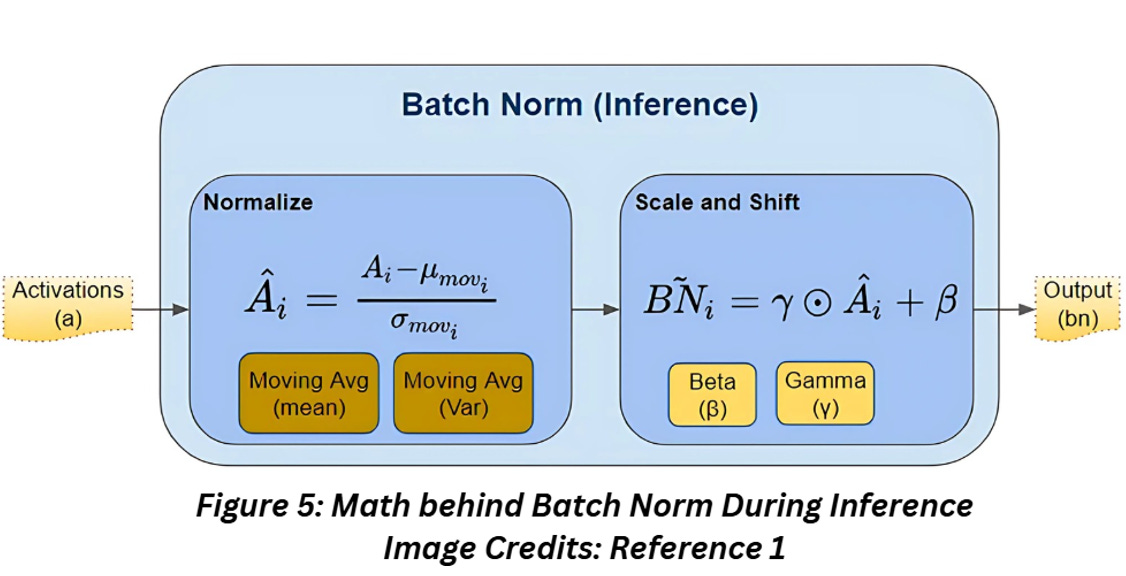
One of the differences during training and inference is the fact that inference doesn’t involve batches. So how do we implement batch norm without batches?
This is where the EMA parameters saved from the training comes handy- saving up all the mean and variance calculated during the training would be memory intensive, so a better way is to use the most recent EMA values as the mean and parameters of the data.
Does batch size impact batch norm results?
Yes, it does. Using batch norm with small batch sizes might not be a good idea and might cause your network to become unstable, even fail. I mean since the process depends on the statistics calculated from the batch, will there be any significance of the stats generated from a handful of images? For a larger batch size, the stats will be a closer approximation of the whole training dataset, which is obviously what we want. But as usual, a massive batch size increases the risk of getting stuck in local minima so there’s that.
As for using a batch size of 1, I’m not sure why you’d want to try that but there might be a few hacks around that, listed in reference 10.
REFERENCES
1) Batch Norm explained: https://towardsdatascience.com/batch-norm-explained-visually-how-it-works-and-why-neural-networks-need-it-b18919692739
2) Batch Norm and Batch Size: https://datascience.stackexchange.com/questions/41873/batch-normalization-vs-batch-size
3) Batch vs Epoch: https://machinelearningmastery.com/difference-between-a-batch-and-an-epoch/
4) Normalizing and type casting images: https://stackoverflow.com/questions/55859716/does-normalizing-images-by-dividing-by-255-leak-information-between-train-and-te
5) Floating point multiplications and modern hardware: https://sioso.medium.com/int-vs-float-double-performance-for-matrices-neural-networks-7aa30ef63a72
6) Scaling images for deep learning: https://machinelearningmastery.com/how-to-manually-scale-image-pixel-data-for-deep-learning/
7) Adding L2 regularization with batch norm: https://blog.janestreet.com/l2-regularization-and-batch-norm/
8) Regularization: https://towardsdatascience.com/regularization-in-machine-learning-76441ddcf99a
9) Batch norm first paper: https://arxiv.org/pdf/1502.03167
10) Batch size 1 and batch norm: https://www.reddit.com/r/MachineLearning/comments/rfum8k/d_batch_normalisation_with_batch_size_1/